What is the DabDash multi-site dashboard?
It is one login for the dispensaries you operate. It lists your shops, rolls up orders and customers, compares two to four sites, and opens a shop when you need to work inside it.
List your shops, compare orders and revenue, then open the store that needs you.
When you run more than one dispensary, the question at the start of the day is simple: which shop is busy, and which one needs you. The multi-site dashboard answers that before you open a single store.
The screen lists your shops and rolls up orders and customers for last calendar month, or the last 7, 30, or 90 days. Pick two, three, or four sites and compare revenue, orders, average order value, and new customers. Revenue and orders also show the change against the period before.
Multi-location is multi-store. Each location stays a full storefront: its own address, domain, catalog, inventory, and customers. The dashboard reads across them, and you open any location to work inside it.
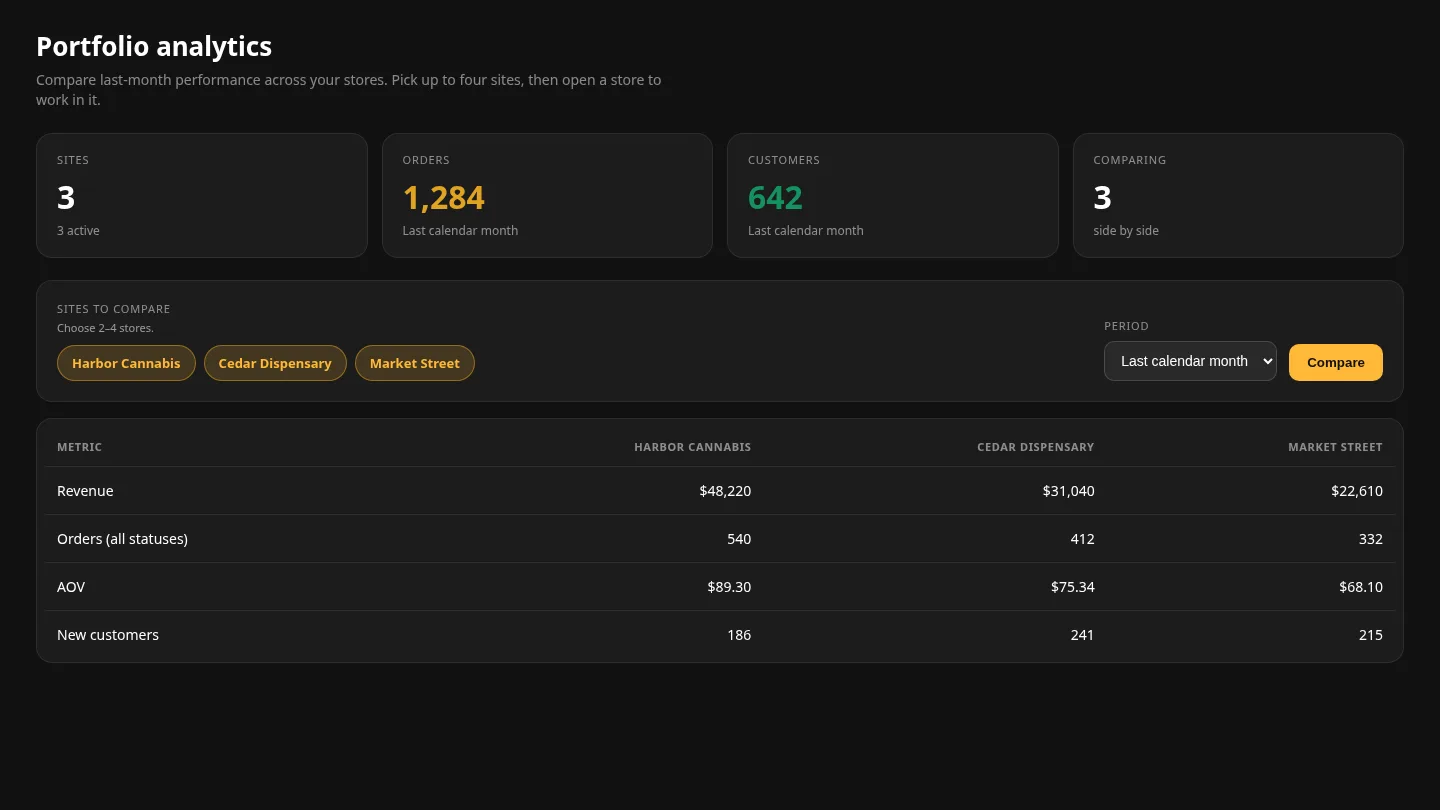
Comparing numbers is the start. When a shop needs a price change, a zone edit, or a look at tonight’s routes, you open that store from the list and work inside it.
You land as the operator of that shop. Its menu, its drivers, and its orders are the only ones on screen. Leave that shop and you are back on the portfolio.
Routing, dispatch, and the driver app belong to the shop you opened. Every location has its own window, its own routes, and its own on-the-way texts.

You ask to link a shop by its slug or domain. The claim includes the owner’s email, last month’s revenue in that store’s currency, and last month’s order count for every status.
Someone on the platform checks those figures against the store. When the claim is accepted, the shop shows up on your dashboard. Until then, it is not in your totals.
The shop you already run is the first one on the portfolio. A further location is another storefront, and it joins this dashboard only after the claim is accepted.
Multi-location is multi-store. Every site is a full storefront with its own catalog, prices, stock, customers, and driver app, and you run all of them from this dashboard.
Zones are delivery areas inside one shop, not extra stores. If two counters need two menus, they are two shops on this dashboard.
What you do get is the operator view: who sold what, how the shops compare, and a door into the one you need to run.
The storefront, the zones, and the routing desk are all inside the shop you open.

Stop order, dispatch, and the driver app inside each shop.
The storefront and zones each location gets on its own.

How this dashboard differs from an enterprise multi-location register.
What to look for when you compare cannabis platforms.
It is one login for the dispensaries you operate. It lists your shops, rolls up orders and customers, compares two to four sites, and opens a shop when you need to work inside it.
Yes. Each shop has its own address, domain, catalog, inventory, and customers. The dashboard reports across them. It does not combine them into one menu.
Yes. Multi-location is multi-store. Each location is its own storefront, with its own catalog and stock, and this dashboard is where you watch and open all of them.
Open it from the sites list. Each location is a full store, with its own catalog, stock, driver routes, and driver app.
Submit a claim with the shop’s slug or domain, the owner’s email, last month’s revenue in that store’s currency, and last month’s order count for every status. After review, the shop appears on your dashboard.
Revenue, orders, average order value, and new customers, for two to four sites, over last calendar month or the last 7, 30, or 90 days. Revenue and orders also show the change against the period before. You can download a sheet with one row per shop: name, host, whether it is active, order count, and customer count.
Each shop keeps the loyalty its own customers earned. You still run every shop from this dashboard.
Yes. Many operators keep an in-store register and use DabDash for each location’s delivery storefront, then watch those storefronts from this dashboard.
Start your 14-day free trial on the first storefront. Add the next shop when you are ready.
Start free trial